 Skip to content


Most hosting comparisons argue about speed. The real difference between managed WordPress hosting vs shared hosting is who does the work. With shared hosting you pay less and look after WordPress yourself. With managed hosting you pay more and someone else carries some, or most, of that load.
Which one is right depends on how important the site is to your business, how much traffic it handles and whether anyone on your team has the time and skill to keep WordPress updated, backed up and secure. This guide sets out the trade-off plainly, so you can choose on facts rather than labels.

Key takeaways
| Question | Short answer |
|---|---|
| Can WordPress run on shared hosting? | Yes. But a plan that supports WordPress is not the same as one that looks after it. |
| What does managed hosting take care of? | Server work and some or all WordPress upkeep. The exact scope varies by provider, so read it. |
| Which is faster? | Neither label guarantees speed. Server setup, caching, resources and the site itself decide it. |
| Which is more secure? | A firewall helps, but most WordPress risk sits in plugins. Someone has to update them. |
| How should you compare cost? | Add hosting, maintenance, backups and the value of your own time, not just the monthly fee. |
| Who is shared hosting right for? | Small, steady sites with an owner who can handle routine WordPress maintenance. |
What is shared hosting?
Shared hosting puts many customers’ websites on the same server and divides its resources between them. The host keeps the server running. You, or whoever built your site, are usually responsible for WordPress itself: core, theme and plugin updates, user access, backups you can restore and fixing anything that breaks.
It is the cheapest way to get a WordPress site online, and for many small sites it is perfectly adequate. The catch is that a plan described as “WordPress hosting” may simply mean WordPress can be installed on it. That does not hand any of the maintenance to the host.
What is managed WordPress hosting?
Managed WordPress hosting is hosting configured specifically for WordPress, where the provider takes on some of the operational work. That can include server-level caching, security monitoring, WordPress core updates, backups and WordPress-aware support.
“Managed” is not a standard bundle, though. One provider manages the server and WordPress core but leaves plugins to you. Another applies and checks plugin updates too. Some, including us, separate the two: managed WordPress hosting for the server, and a care plan for the hands-on work on the site.
And to clear up a common question: WordPress does not host your website. WordPress is the software your site runs on. A hosting provider supplies the server that puts it online.
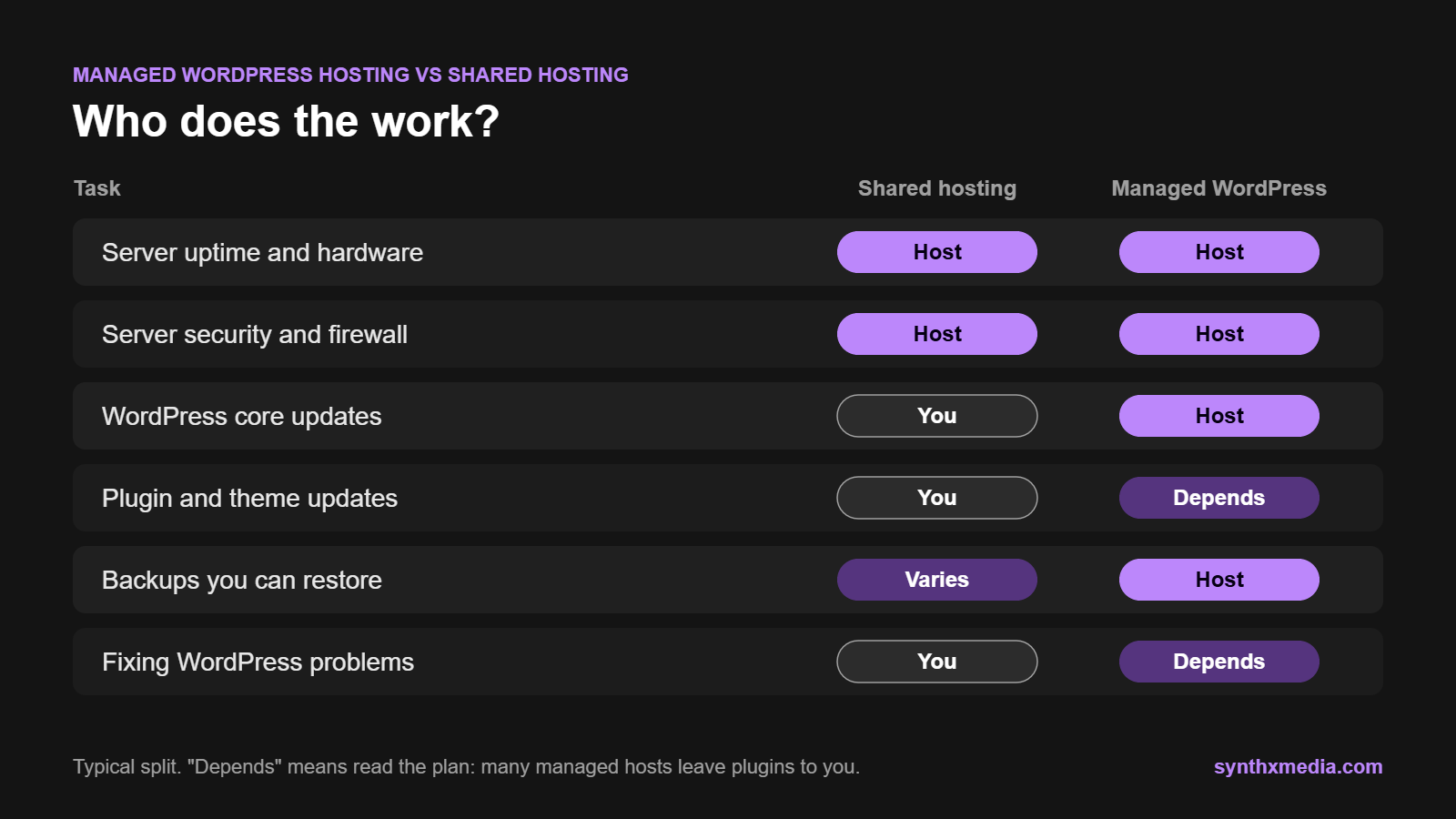
Managed WordPress hosting vs shared hosting: who does what
The clearest way to compare the two is by responsibility. Use this as a starting point, then check the actual plan you are considering:
| Task | Shared hosting | Managed WordPress hosting |
|---|---|---|
| Server uptime and hardware | Host | Host |
| Server security and firewall | Host, usually basic | Host, tuned for WordPress |
| WordPress core updates | Usually you | Usually the host |
| Plugin and theme updates | You | Depends on the plan |
| Backups you can restore | Varies, often extra | Usually included |
| Fixing WordPress problems | You or your developer | Depends on the plan |
| Content changes | You | Usually you, unless a care plan covers it |
Performance: what actually makes a WordPress site fast
On speed, managed WordPress hosting vs shared hosting is closer than the marketing suggests. Managed hosting often performs better because the server is configured for WordPress and includes server-level caching. But the label alone does not fix a slow site, and a well-resourced shared plan can perform perfectly well for a small business.
Look past the marketing. “Unlimited bandwidth” does not mean unlimited processing power, and a busy site can still hit limits on CPU, memory or the number of processes it can run at once. Ask what resources the plan includes and what happens when traffic spikes.
Server location matters too. If your customers are in South Africa, a server in South Africa cuts the distance data has to travel, which helps every page load.
Before you blame the host, rule out the site itself:
- Check speed at different times of day, including your busiest periods.
- Look at your hosting account for resource warnings or throttling.
- Review heavy plugins, oversized images and third-party scripts, which slow a site on any host.
- Notice the pattern: the whole site slowing under traffic points to hosting, while one slow page usually points to the page.
If the bottleneck is the site, upgrading hosting just means paying more for the same problem.
Security, updates and ongoing maintenance
Here is the part most hosting comparisons skip. According to Patchstack’s State of WordPress Security in 2026 report, 11,334 new vulnerabilities were found in the WordPress ecosystem in 2025. 91% were in plugins and 9% in themes, with only six low-priority issues in WordPress core.
That changes the question. A server firewall helps, but most of the risk sits in the plugins and themes on your site, and someone has to keep them updated and check nothing breaks afterwards. On shared hosting that someone is usually you. On managed hosting it depends entirely on the plan, so ask directly:
- Who applies plugin and theme updates, and how often?
- Does anyone check the site still works after updating?
- What does security monitoring cover, and who responds if the site is compromised?
Our WordPress hosting runs on LiteSpeed servers behind the Imunify360 firewall, with unlimited bandwidth. The hands-on work, such as updates, backups and security checks, sits in a separate website maintenance plan, so you can see exactly what you are paying someone else to do.
Managed is a service scope, not a speed or security guarantee. Read what it covers.
Backups and restores
A backup is only useful if you can restore it quickly. Before choosing between managed WordPress hosting vs shared hosting plans, find out:
- How often backups run and how long they are kept
- Whether backups are stored separately from the server they protect
- Who carries out a restore, how long it takes and whether it costs extra
- What happens to orders or form entries made after the last backup
For stores and busy sites, ask whether there is a staging copy where updates can be tested before they reach the live site. On our care plans, backups run monthly on Starter and Basic, weekly on Business and daily on Custom, and a site that breaks is rolled back from backup.

Compare the full cost, not only the monthly fee
In any managed WordPress hosting vs shared hosting comparison, shared hosting wins on the sticker price. Whether it wins on total cost depends on what you add to it: paid backup tools, security plugins, a developer’s time when an update breaks the site, and your own hours spent troubleshooting instead of running the business.
Compare like with like: the same billing term, the same support and the same maintenance. Introductory prices often apply only when you pay for a year upfront, so check the renewal price too.
On our hosting and care pricing page the two are priced separately. Hosting starts at R70 a month, or R770 a year with a month free. Care plans start at R350 a month for technical upkeep, rising to plans with content hours and more frequent backups. Hosting is month to month, and we move existing sites over free of charge.
Support and technical control
Support is where managed WordPress hosting vs shared hosting differs most. When WordPress breaks, general hosting support and WordPress support are not the same thing. Ask whether the support team will look into plugin conflicts, failed updates and database errors, or only help with server access and billing.
Managed hosting can also mean less control. Some managed platforms block certain plugins or server settings because they clash with their caching or security. If your site relies on a custom plugin, scheduled tasks or unusual settings, check the rules before you move.
Managed WordPress hosting vs shared hosting: which should you choose?
| Shared hosting is usually enough when | Managed WordPress hosting fits better when |
|---|---|
| The site is small with steady traffic | The site brings in leads or sales every day |
| Someone in-house can maintain WordPress | Nobody has the time or skill to maintain it |
| Downtime would be inconvenient, not costly | Downtime costs you enquiries or orders |
| The setup is simple, with few plugins | You run WooCommerce, bookings or integrations |
Neither option removes every performance or security problem. The deciding question is simple: if the site broke tonight, who would fix it, and how much would the delay cost you?
Moving from shared hosting to managed WordPress hosting
You can switch hosts without taking the site offline, but the move needs testing. A sensible migration looks like this:
- Take a full backup and record your setup: email routing, forms, payment tools, scheduled tasks and integrations.
- Copy the files and database to the new host and test the copy privately before changing anything live.
- Check key pages, logins, forms, checkout and integrations. For a store, plan the cutover so no orders are lost.
- Point the domain to the new server only once the copy works, then monitor the live site and email.
If you are planning a move, our guide on what an SSL certificate does is worth a read too, since the certificate needs to be in place on the new server before you switch.
Frequently asked questions
Is shared hosting good enough for WordPress?
For a small site with steady traffic and someone who can handle updates and backups, yes. It becomes a risk when the site brings in daily leads or sales and nobody is responsible for maintaining WordPress.
Is managed WordPress hosting worth the extra cost?
It is worth it when downtime or a hacked site would cost you enquiries or orders, or when your time is better spent running the business than troubleshooting WordPress. Compare the total cost, including maintenance and your own time, not just the monthly fee.
Does managed WordPress hosting guarantee my site will never go down?
No. No host can guarantee zero downtime. Ask how the provider monitors uptime, communicates incidents and restores a site when something goes wrong.
Can I keep my domain and email separate from my hosting?
Yes. Your domain, email and website hosting can sit with different providers. Keep your DNS and mail records set up correctly so changing web host does not interrupt your email.
Will moving hosts change my website design or content?
No. A migration copies your WordPress files and database, which hold your content and design. Differences in server setup or caching can affect how the site behaves, so test the copy before switching over.
Where should my website be hosted if my customers are in South Africa?
On a server in South Africa where possible. Shorter distances mean faster load times for local visitors, and a content delivery network can help if you also have customers overseas.
Pay for the work you do not want to do
The choice between managed WordPress hosting vs shared hosting is really a choice about responsibility. Shared hosting is fine when the site is simple and someone you trust keeps WordPress updated. Once the site brings in leads or sales every day, paying someone to look after it is usually cheaper than the first emergency.
Not sure where your site stands? Request a free website audit and we will check its speed, security and setup, or compare our hosting and care plans and get in touch about moving your site over free of charge.
