 Skip to content


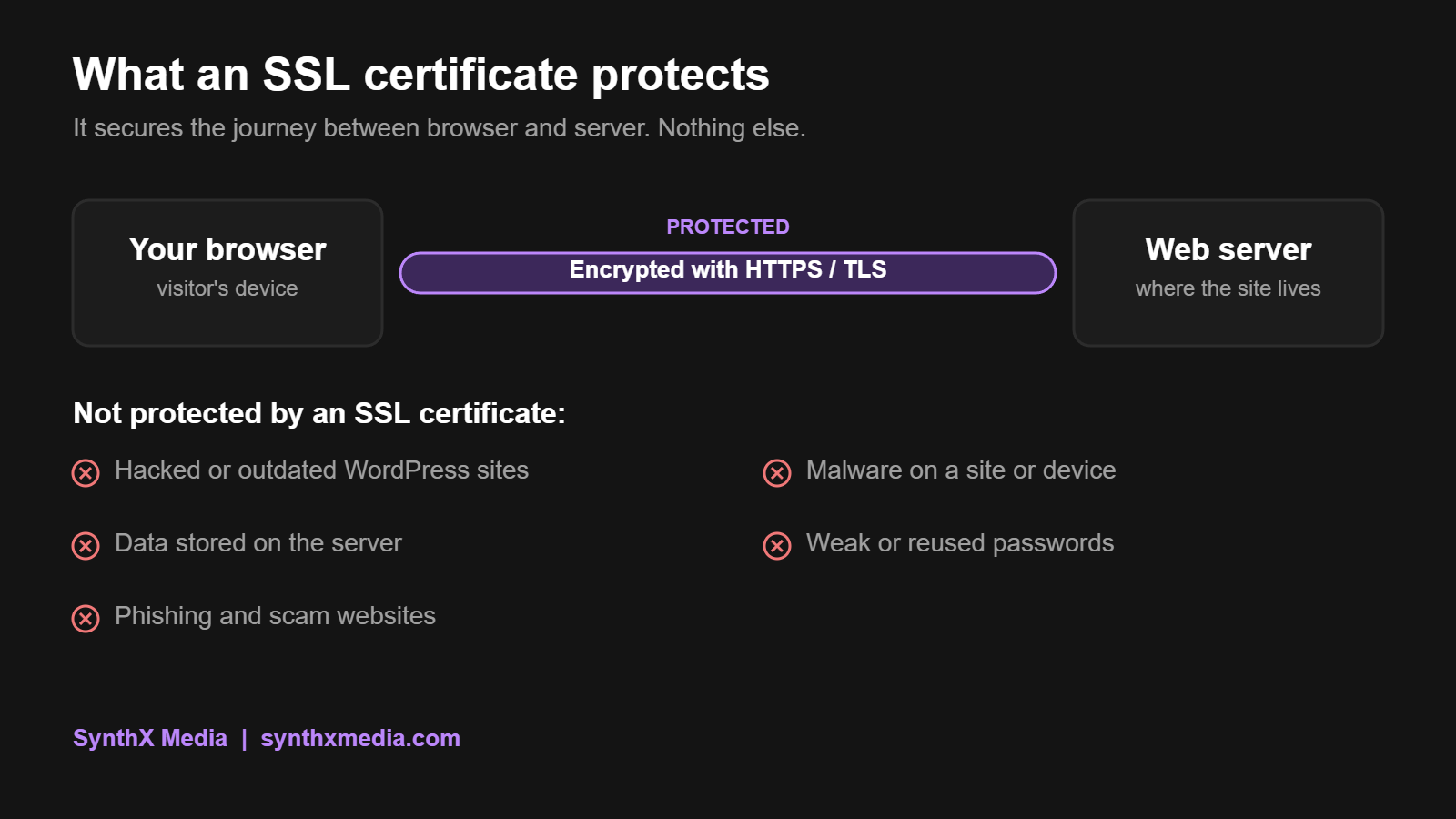
Most people still read the padlock in their browser as “this website is safe”. Google disagreed strongly enough that it removed the padlock from Chrome in 2023 and replaced it with a neutral settings icon. The reason is simple: an SSL certificate protects the connection to a website. It says nothing about whether the website itself can be trusted.
This guide explains what an SSL certificate does, what it does not do, how to check one, and what the new shorter certificate lifespans mean for South African business websites from 2026.

Key takeaways
| Question | Short answer |
|---|---|
| What does an SSL certificate do? | It lets a browser confirm it is talking to the right website address and set up an encrypted connection that protects data in transit. |
| Is it SSL or TLS? | Modern websites use TLS. “SSL certificate” is the older name that stuck. |
| Does HTTPS mean a site is safe? | No. Phishing sites use valid certificates too. HTTPS protects the connection, not the honesty of the site. |
| Which type do most businesses need? | A domain validated (DV) certificate, which is often free and provides the same encryption as paid options. |
| What changed in 2026? | Maximum certificate lifespan dropped to 200 days on 15 March 2026, heading to 47 days by 2029. Renewal must be automated. |
| What else does a secure site need? | Updated software, strong logins, backups, malware scanning and an HTTP to HTTPS redirect. |
Quick answers
What is an SSL certificate?
An SSL certificate is a digitally signed file that links a website address to a public key. Your browser checks it before loading the site, then uses it to set up an encrypted HTTPS connection so information travelling between you and the server cannot be read or changed along the way.
Is SSL the same as TLS?
Not quite. SSL is the original protocol and is now obsolete. Today’s secure connections use TLS, its successor. The certificates are still widely called SSL certificates, so both terms refer to the same product.
Does a padlock or HTTPS mean a website is safe?
No. It means the connection is encrypted. A fake banking page or a scam online store can use a valid certificate. Check the web address, how you got there and why the site wants your details before trusting it.
What an SSL certificate actually does
An SSL certificate does two jobs, and only two:
- Proves the address. The browser checks that the certificate was issued for the exact hostname you visited, that it is within its validity dates, and that it chains back to a certificate authority the browser trusts.
- Enables encryption. Once the browser accepts the certificate, it and the server agree on session keys and encrypt everything they exchange. Anyone on the same Wi-Fi network or along the route cannot read or tamper with that traffic.
Without a certificate, a site can only load over plain HTTP. Chrome has labelled every HTTP page “Not secure” since 2018, which is not the first impression you want on a quote form or checkout.
How the TLS handshake works, in plain terms
When you open an HTTPS site, your browser and the server run a short exchange called the TLS handshake before any page content loads:
- The browser says hello and lists the security settings it supports.
- The server replies with its chosen settings and its SSL certificate.
- The browser checks the certificate: right hostname, valid dates, trusted issuer.
- Both sides generate temporary session keys for this visit only.
- From then on, all data is encrypted with those keys.
This takes a fraction of a second. The certificate’s role is to authenticate the server; the actual data is protected by the temporary session keys, which is why a stolen session key from one visit does not unlock other visits.
DV, OV and EV: which SSL certificate does your business need?
All three types give you the same strength of encryption. The difference is how much the certificate authority checks about who you are before issuing it.
| Type | What is checked | Cost | Best for |
|---|---|---|---|
| Domain Validated (DV) | That you control the domain | Often free | Most business websites, blogs and online stores |
| Organisation Validated (OV) | Domain control plus your registered business details | Paid | Companies that want verified details inside the certificate |
| Extended Validation (EV) | A stricter check of the legal entity | Paid, highest | Banks and large enterprises with compliance requirements |
One point that surprises people: browsers stopped showing the company name in the address bar for EV certificates in 2019, so visitors no longer see any visible difference. For a typical small or medium South African business, a properly configured DV certificate is the right choice. Spend the difference on maintenance instead.
What an SSL certificate does not do
This is where most misunderstandings sit. An SSL certificate will not:
| It does not | What actually protects you |
|---|---|
| Stop hackers getting into an outdated WordPress site | Core, plugin and theme updates, plus a web application firewall |
| Protect data once it is stored on your server | Server security, access control and encrypted backups |
| Prove a website is honest or legitimate | Checking the address, the business and how you got there |
| Remove malware already on a site or device | Malware scanning and clean-up |
| Protect weak or shared passwords | Strong unique passwords and two-factor authentication |
That is why Chrome replaced the padlock with a neutral icon in version 117: research showed many people believed the padlock meant a site was trustworthy. Encryption is now treated as the minimum, not a badge of safety.
Why it still matters for South African businesses
- Trust at the point of conversion. A “Not secure” warning next to a contact form or checkout costs you enquiries and sales.
- Search visibility. Google has used HTTPS as a lightweight ranking signal since 2014. It will not lift a weak page, but missing HTTPS is a disadvantage you do not need.
- POPIA. Section 19 of the Protection of Personal Information Act requires reasonable technical measures to secure personal information. Encrypting forms that collect names, numbers and email addresses is part of that baseline, although HTTPS alone does not make a site POPIA compliant.
- Online payments. Payment gateways such as PayFast, Peach Payments, Ozow and Yoco expect stores to run on HTTPS.
How to check an SSL certificate
Checking a site’s SSL certificate takes under a minute:
- Click the icon to the left of the web address. In Chrome it is the site information icon; other browsers show a padlock.
- Choose “Connection is secure”, then “Certificate is valid”. The wording varies slightly between browsers.
- Check three things: the domain names it covers, who issued it and the expiry date.
- For a deeper test of your own site, run the free SSL Server Test from Qualys SSL Labs. It grades your configuration and flags chain or protocol problems.
If a browser shows a warning, stop and find out why before entering any details. The usual causes:
| Warning | What it usually means |
|---|---|
| Certificate expired | Renewal failed or was forgotten |
| Name mismatch | The certificate does not cover that exact address, often the www or non-www version |
| Untrusted issuer | A self-signed certificate or an incomplete certificate chain on the server |
| Mixed content | The page is HTTPS but still loads images or scripts over HTTP |
Certificate lifespans are getting much shorter
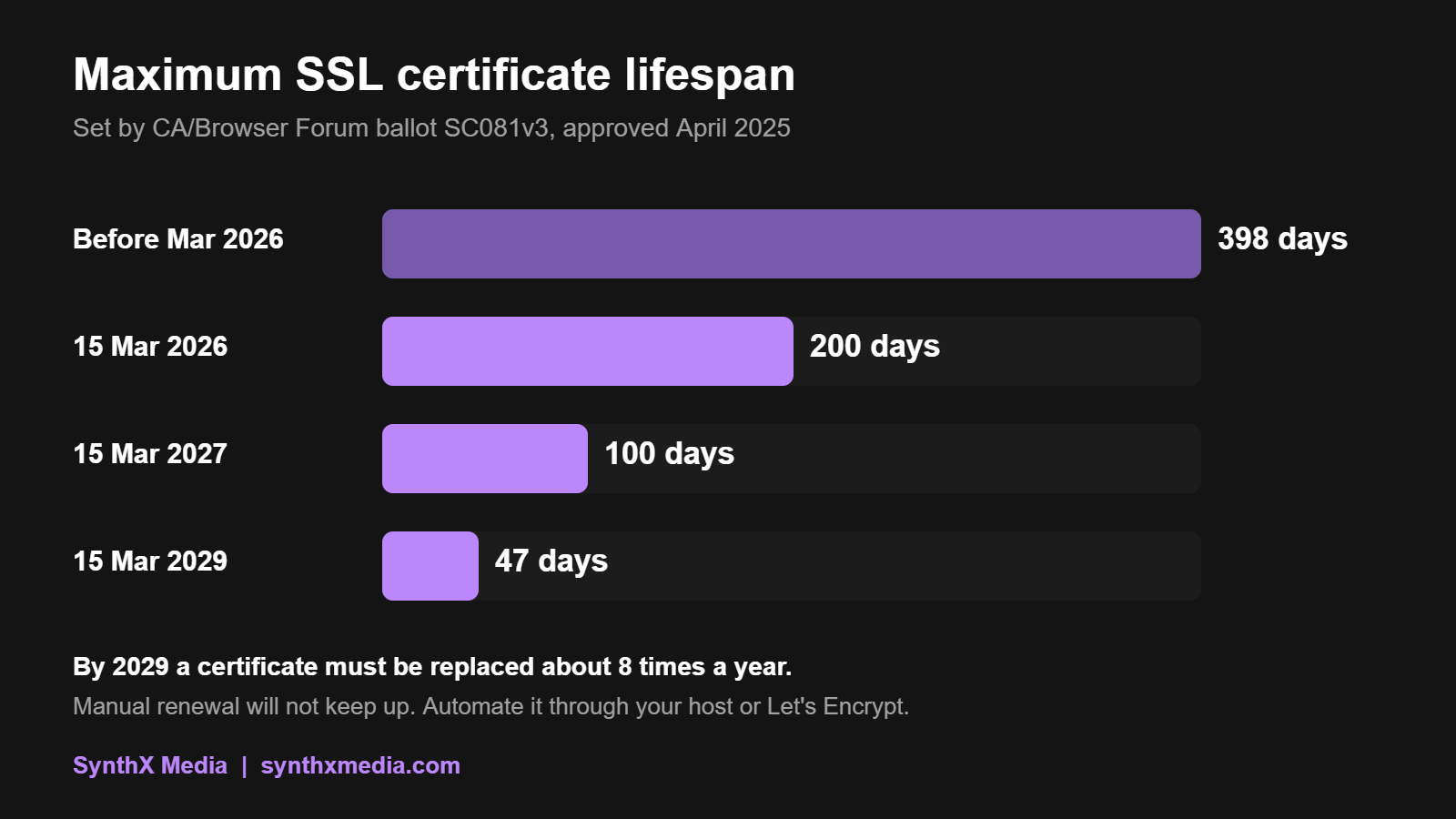
In April 2025 the CA/Browser Forum, the body of certificate authorities and browser makers that sets the rules, approved ballot SC081v3. It cuts the maximum lifespan of a public SSL certificate in stages:
| From | Maximum certificate lifespan |
|---|---|
| Before 15 March 2026 | 398 days |
| 15 March 2026 | 200 days |
| 15 March 2027 | 100 days |
| 15 March 2029 | 47 days |
What this means in practice: if anyone renews your certificate by hand once a year, that process is already broken. By 2029 a certificate will need replacing roughly eight times a year. Automated renewal through your hosting provider, or a free service such as Let’s Encrypt, is now essential rather than optional.

Website security checklist
- The certificate covers every address visitors use, including both www and non-www.
- All HTTP traffic redirects permanently to HTTPS.
- No mixed content warnings on any page.
- Renewal is automatic, and someone is alerted if it fails.
- The full certificate chain is installed on the server.
- WordPress, plugins and themes are kept up to date.
- Backups run regularly and are stored off the server.
The certificate lives at the hosting level; everything else on that list is ongoing upkeep. Our web hosting and website maintenance plans cover the server and the software respectively, and our free hosting check includes whether your SSL is set up properly.
Frequently asked questions
Are free SSL certificates as secure as paid ones?
Yes, for encryption. A free domain validated certificate from a trusted authority such as Let’s Encrypt uses the same encryption as a paid one. Paid certificates add identity checks, warranties or support, not stronger encryption.
How much does an SSL certificate cost in South Africa?
Many South African hosts include a free DV SSL certificate with their hosting packages. Paid OV and EV certificates cost more because of the identity checks involved. Check what your hosting package includes before buying one separately.
Can one SSL certificate cover several subdomains?
Yes. A certificate can list several hostnames, or a wildcard certificate can cover all first-level subdomains, such as shop.example.co.za and blog.example.co.za. The www and non-www versions of a domain must both be covered.
Does installing an SSL certificate automatically redirect visitors to HTTPS?
No. The certificate makes HTTPS available, but the server or website must be set to redirect HTTP requests to HTTPS. Internal links and images still pointing to HTTP should also be updated to avoid mixed content warnings.
What happens if my website’s SSL certificate expires?
Browsers show a full-page security warning and most visitors will leave. Forms, logins and checkouts effectively stop working until a valid certificate is installed. Automated renewal and expiry monitoring prevent this.
The bottom line on SSL certificates
An SSL certificate is essential, but it is the starting point of website security, not the finish line. It encrypts the connection and confirms the address. Everything else, from software updates to backups and strong logins, still has to be done.
Not sure whether your site’s certificate, redirects and renewals are set up properly? Run our free instant site check or talk to our team and we will tell you what needs fixing.
Sources: DNSimple, SSL certificate validity changes 2026 to 2029 (CA/Browser Forum ballot SC081v3); Qualys SSL Labs SSL Server Test; Let’s Encrypt.
